
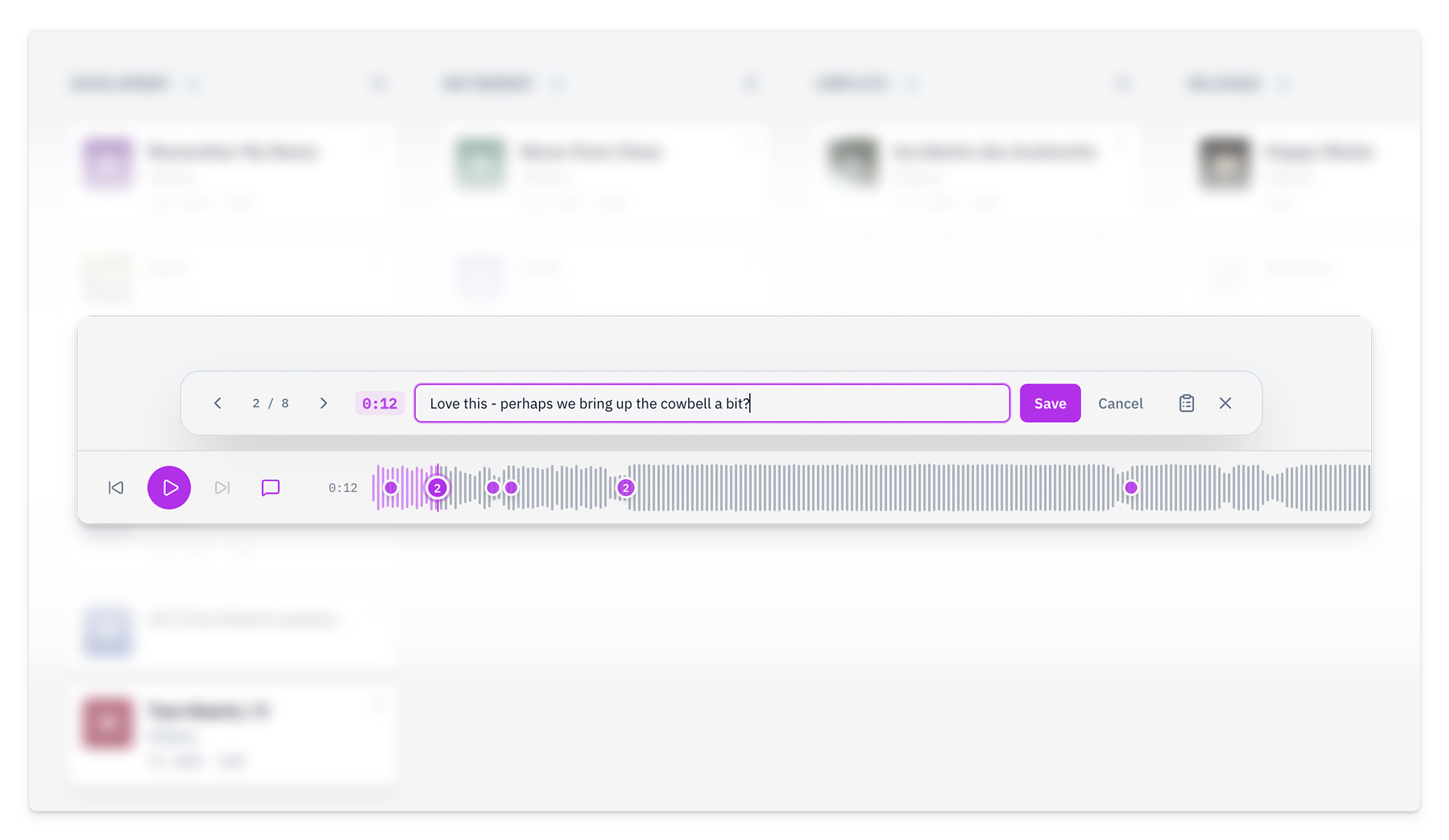
If you’ve spent any time collaborating with other musicians and audio professionals during the studio production process, you’ll understand the pain of vague feedback and production notes. For mix engineers, it could be an email asking to “make it a bit warmer”, a text saying the verse “needs more vibe”, or an unstructured hot-take voice message a band member recorded while driving to rehearsal that you have to listen to five times to decipher for any actionable instructions.
When the artist and producer/engineer don’t have an effective communication system, everyone loses. A project that should be wrapping up can stretch on significantly longer, especially if it’s an EP or full album.
The solution is actually pretty simple. It just requires decent upfront planning to agree on a communication approach, plus a system that reduces contradictions and guesswork and, most importantly, keeps all feedback in one place rather than scattered across chat threads, emails, and in-person conversations.
Below, I discuss several ways that feedback can be improved from both angles - how artists and bands can improve the notes they give, and how producers and engineers can make sure systems and expectations are put in place to encourage decent feedback. I also outline how I’ve designed the systems within The Music Factory Suite to make this easy for both the artists and the engineers/producers.
For Artists: How to Give Useful Mix Feedback
Even though the song is your creative work, and you are rightfully attached to how it sounds, remember that your mix engineer is also a human being putting their creative and technical skills to work. You want them invested in your music so they give it their best effort, so being both clear and polite is highly recommended.
→ Test the mix on familiar playback systems
Don’t judge a mix solely on unfamiliar studio monitors or headphones. Listen to it in the places you normally consume music, such as your car, your everyday earbuds, or the Bluetooth speaker you use in the kitchen. Your brain already has a built-in reference for how finished, professional records are supposed to sound on those systems, making it much easier to spot genuine balance issues.
→ Lead with the good
When you send mix notes, resist the urge to dive straight into a list of everything you think is “wrong” or “needs fixing”. Taking a sentence or two to acknowledge what you genuinely like about the mix does two important things:
It builds momentum: A little encouragement goes a long way toward keeping the engineer on your side and enthusiastic about the project.
It protects the good stuff: If you don’t mention the elements you already love, the engineer might unknowingly alter or rebalance them while chasing other fixes in the next revision.
→ Be specific and use timestamps
Instead of relying on broad feelings, anchor your thoughts to specific moments in the audio that the engineer can unambiguously address. Pointing out that the snare feels buried behind the guitars at 1:14, or that the lead vocal needs a slight volume lift heading into the second chorus at 2:05, gives your engineer an immediate, actionable target they can quickly tick off.
→ Watch out for “demo-itis”
If you have spent months listening to a rough demo while writing and recording, any professional mix is going to sound jarring at first just because it is different. Before firing off a list of changes, take a step back and separate genuine issues from things that just feel unfamiliar compared to the rough bounce you’re used to.
→ Group your notes chronologically
If you aren’t using a waveform-commenting tool that automatically sorts feedback by time, organise your written notes from the start of the song to the end (0:00 through to the outro). This lets the engineer work through the session linearly rather than jumping back and forth across the timeline.
For Producers & Engineers: How to Set Up the Feedback Process
If you’re the producer or mix engineer, you don’t have to passively wait for chaotic notes to roll in. You can significantly improve the quality of the feedback you receive by setting clear parameters before you send the first mix.
→ Appoint a single point of contact
When mixing for a band or group, establishing one point of contact early on is the most important boundary you can set.
Suggest that all the band members listen to the mix, make their own notes, and discuss (or argue) amongst themselves first. Once they reach a consensus, one designated person consolidates those thoughts into a single, clear list of requests to send to you. If you skip this step, you’ll end up juggling contradictory requests across multiple email threads and group chats - not ideal. Get ahead of this and set up your comms plan early.
→ Try out a 48-hour listening buffer
Asking an artist to live with a mix for a day or two before sending notes benefits everyone. When artists first hear a new mix, excitement or anxiety often triggers an immediate urge to react.
Suggesting they take at least 48 hours to listen on a few different playback systems lets those scattered, reactive hot takes settle (I know some producers/engineers who suggest up to a week!). After a couple of days, a long list of minor tweaks naturally shrinks. The artist gets used to the new sonic balance, gathers perspective from trusted ears, and often realises that some of the things they initially questioned actually work well for the song. It’s always better to spend your studio time working on settled, intentional changes rather than chasing fleeting first impressions.
If you use The Music Factory Suite to collect timestamped notes pinned directly to the waveform via client share links, you can even set a ‘Listening Buffer’ that temporarily disables comments and includes a custom message. Note that whether to use this feature should depend on the project and your relationship with the artist - you absolutely do not want to come across like a gatekeeper, so effective communication is essential. Explain to the artist beforehand why you think the listening buffer is a good idea, and as long as they’re fine with it, you can say something along the lines of this when you send the first mix:
“Hey all. Here’s the new mix - hope you like it! Please take a good listen over the next couple of days to gather your thoughts before sending feedback. Commenting comes online at [time/date] so you can let me know any changes you’d like me to make!”
→ Level-match your revisions to the previous mix
The human ear is easily tricked by slight volume differences; louder almost always sounds better. If your second mix is a few decibels different from the first one you sent, the artist’s perception of the EQ and balance will be skewed. Keep your bounce loudness consistent across versions so they’re only judging your intentional mix changes.
→ Ask clarifying questions before making changes
If an artist sends a vague note like “the chorus feels a bit small”, resist the urge to guess what they mean and risk spending time tweaking the wrong things. Get back in touch to clarify. You’re the technical expert; not all clients will have the understanding or the right language to describe exactly what they mean, so part of your job will always be translation. Five minutes talking it through can save hours of wasted studio time.
→ The ‘write your own mix notes’ trick
Here’s a tip I learnt from the legendary Andrew Scheps during a studio workshop several years ago. If you’re about to send your mix to a client and find yourself qualifying it with comments like “just so you know, I haven’t done the vocal automation yet”, “I know the bass isn’t sitting quite right”, or “the BVs aren’t mixed in properly yet”, you’ve just written your own mix notes. Don’t hit send - spend a bit more time fixing those issues, and send the email once you can say “Hey! Here’s the mix”.
It’s better for the artist to wait another day or two than to receive something you know isn’t up to scratch. Yes, they will likely be messaging you impatiently to hear something, but unless you’ve been dragging your heels and taking longer than agreed, make sure you send something you’re pleased with. The artist will be happier with the result, and you’ll get fewer requests for mix revisions.
What System to Use for Music & Mix Feedback
When a producer or mix engineer leads the initial conversation with an artist to sort out the communication plan, it makes sense to use a system the artist is comfortable with. Trying to force a band to use WhatsApp can be a pain if they don’t use it for anything else. The same goes for email - it can be a simple, effective option when working with solo artists, but it’s usually not ideal for groups of musicians, particularly when some people don’t check their email regularly (especially common with younger bands!). In many situations, an artist or band will be open to the producer’s or mix engineer’s advice on which communication system to use, so being familiar with systems designed specifically for this purpose is helpful.
Because I’ve been in all of these situations myself - as a solo artist and a band member working with engineers and producers from the musician’s perspective, and as a mix engineer and producer working on other people’s music - I’ve thought a lot about how much communication quality can affect the final outcome and the frustration levels along the way. That became one of my focuses when designing the feedback systems in The Music Factory Suite. I wanted to make sure the system included these features:
Low technical barriers for the artist to make notes. This means working on both desktop and phone, and not forcing people to download an app or log into an account if they don’t want to.
Ability to pin notes to the waveform so that the producer/engineer knows the precise moment the artist is referring to with their comments.
Make sure notes are collected in one place so everyone knows where to comment, and so the engineer isn’t searching through multiple emails and chat threads to collect mix notes.
Keep notes for subsequent versions manageable, so previous mix notes can be quickly checked alongside notes for the latest mix.
Let the engineer check off notes in the app as they’re completed, but also make them easy to copy to the clipboard in one go for those who want to view them in a separate document or workspace.
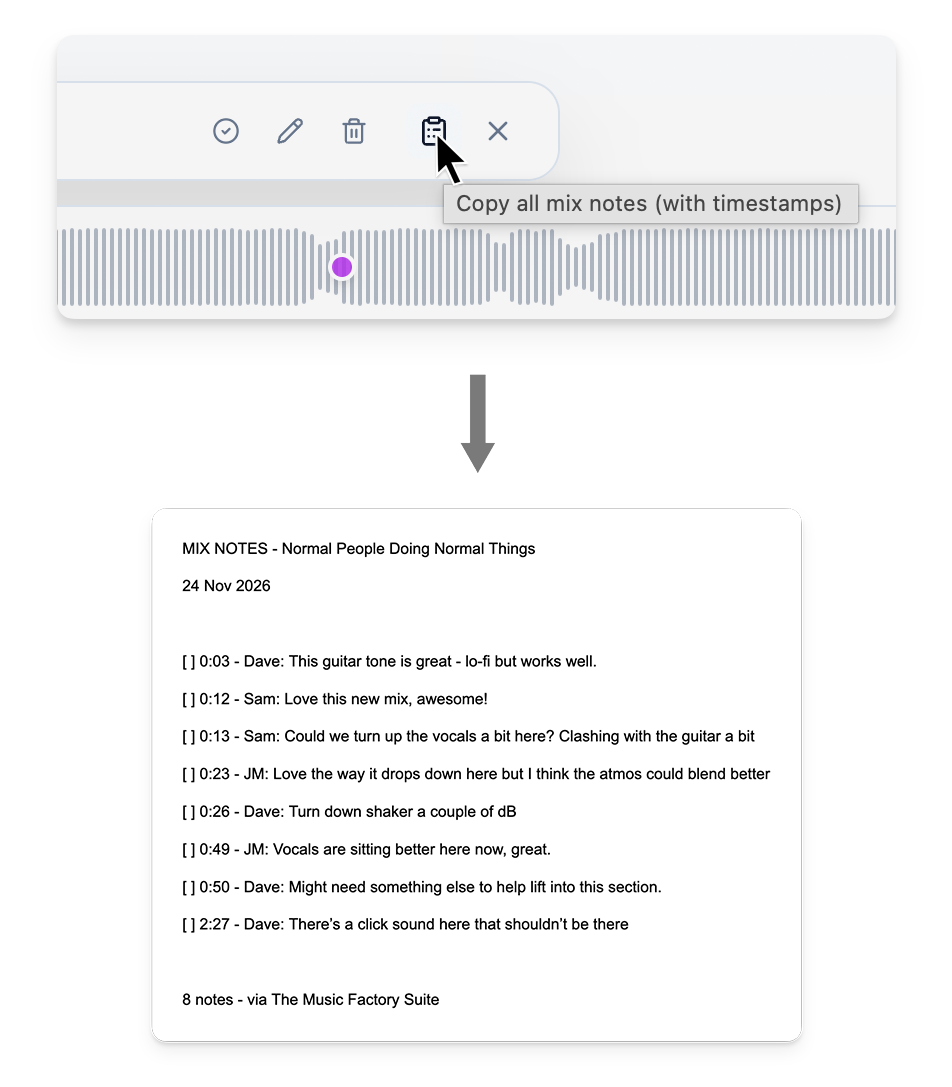
These features are all available in The Music Factory Suite, even with a Free account. If you want to sign up, use the link I’ve made for my Substack readers below to get three months of the Pro account for free so you can explore the advanced features (usually NZ$6.50/mo).
Go to → musicfactory.nz/substack
There are several other systems with music feedback features out there, such as Samply, Highnote and [untitled], though they have a slightly different focus and target user compared to The Music Factory Suite. I’ve put together in-depth comparison pages that stack up the features against these and several other alternative platforms. The Music Factory Suite really shines for artists, bands, and producers who want a comprehensive, collaborative project hub that spans the entire song development process.
Keeping the Focus on the Music
If artists take the time to be clear and specific about what they’re thinking, and producers and engineers establish clear guardrails for how those thoughts are gathered and communicated, the revision process can become a constructive path to a positive outcome rather than a battle of wills. Ultimately, the more time and creative energy artists and audio professionals can devote to the music - rather than being bogged down by unorganised admin and communication issues - the better. When everyone feels good about the project, they’re more likely to apply their skills effectively and move toward the same goal. A good communication style, supported by the right system, will go a long way toward making that a reality.
ICYMI: My Latest Release
Copycat EP 01 is a collection of covers dedicated to artists who have influenced my musical identity. It was a gratifying creative challenge to transform the songs into something new with the sonic fingerprint of n1ghtmar3cat while retaining what made them special to me in the first place.


