

Once things get moving in a creative session and energy is up, it’s all about keeping the momentum going. Whether you’re trying to whip some lyrics into shape or get the instrumentation to sit right, the last thing you want is for your creative flow to break because of technology hurdles that don’t need to be there.
Over the years, I’ve built up a collection of browser bookmarks and apps for creative utility tools that I turn to regularly. These aren’t expensive or complex applications, just simple, functional utilities that quickly solve a specific technical problem so I can get back to being creative. In this article, I’ll share these tools with you; hopefully, reducing some technical friction will help keep you in that flow state more often!
Let’s touch on each of the utility tools I’m talking about and why they’re so useful to have at hand quickly.
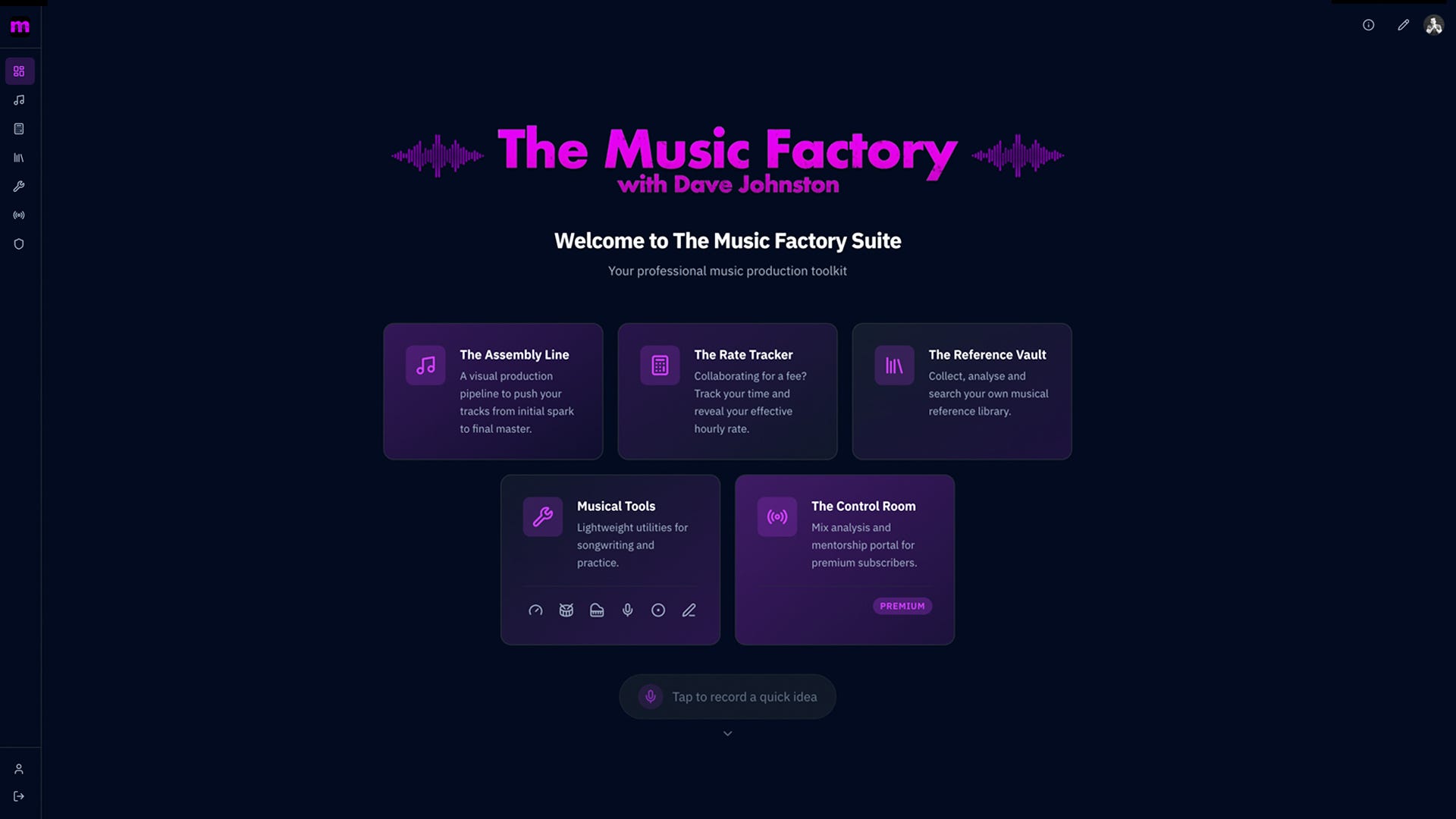
Note: If you’re becoming more serious about the time you spend on your music, I’ll introduce you to a brand new suite I’ve developed that brings all these tools together into a clean, ad-free digital dashboard. This is for people like me who would rather solve all these challenges efficiently in one trusted location. It’s called ‘The Music Factory Suite’, and I’ve included a brief video to demonstrate how I’ve integrated all the handy utility features we’re discussing here.
1. Pulse: Tap Tempo and Metronome
When I’m working with a track that doesn’t have a BPM noted, a reliable tap-tempo tool really speeds things up. While Pro Tools does have a built-in tap-tempo function, I find Taptempo.io faster to access and very accurate, so it has been my go-to for the last couple of years. It’s super basic: open the website, start tapping any key in time with the song, and it gives you the BPM in giant text. Job done, close the tab.
Similarly, a basic metronome is a fundamental requirement when practising or figuring out the right tempo for a song you’re working on. While you’ll use the click track in our DAW when recording, having an easily accessible metronome on your phone or in a browser tab is incredibly useful for off-DAW sessions. I mostly use a phone app for this called Metronome Beats, which has a lot of extra functions, but if all you need is a basic option, you can just type ‘metronome’ into Google; they’ve got one built into their search interface.
2. Words: RhymeZone and Thesaurus
Lyrics can often be the hardest part of the process. When I find myself stuck trying to get a phrase to flow right, sometimes seeing a list of rhymes or the right synonym is all I need to push past the mental block and get the words out. RhymeZone and Thesaurus.com can be great tools to help you get the message across in a way that fits the track. I don’t know how many times I’ve visited those two sites, but it’s a lot!
3. Musical Notes: Online Virtual Piano
There are times when I don’t have a MIDI controller hooked up, and I need to get a chord progression or melody out of my head. In these situations, quick access to a basic musical keyboard interface in an app or browser can help me think through the idea. Typing in ‘online virtual piano’ gives a handful of results, but most have ads all over the place, which can be annoying. OnlinePianist’s Virtual Piano is one of the cleaner options and loads relatively quickly. Sometimes this is all you need for quick note referencing purposes, and it’s much quicker than loading up your DAW to open a virtual instrument.
4. Quick Idea Capture: Voice Recorder & Scratchpad
One of the most useful tools a songwriter or composer should have quick access to is a simple phone recording app. Any modern phone will likely have a built-in recording app for free, though I’ve paid for Easy Voice Recorder Pro, as there are a few useful features that free apps often don’t have. Regardless of what you use, it needs to be really quick to access, so you can hit the record button to hum whatever little idea just popped into your head before it flutters away. My phone is full of recordings of vocal melodies, odd-sounding mouth guitar noises, and badly beatboxed rhythms I’ve recorded so I can pull them up later when I’m at my workstation to turn them into something real. Don’t let those ideas vanish; record them, even if you have to hide in a cupboard at work or go to another room in the middle of the night so you don’t wake up your wife to get that idea down (both personal experiences).
Equally useful is something you can pull up on your phone or computer to quickly jot down lyric ideas you have. As with the recorder, you should have quick access to this. I’ve got a Google Doc just called “Lyrics” which is full of all sorts of lyric ideas from the last decade. If a song I write progresses significantly, I’ll put the lyrics in a separate, appropriately filed document. But to start with, just set something up that you can open quickly and access anywhere without having to think too much.
While I’ve squeezed a lot of value out of the tools shared above over many years, I’m at the point where I find jumping between multiple browser tabs and waiting for different windows to load while accidentally clicking on ads to be more annoying than I’m prepared to deal with if I can help it. It’s still a bit too inefficient, and risks pulling me out of the zone. I wanted all these tools accessible in a single, clean interface - no ads, no distractions, just pure utility. That’s why I created The Music Factory Suite.
All-in-One Toolkit: The Music Factory Suite
The Music Factory Suite is a brand new digital dashboard I built to solve a handful of challenges I’ve faced in my creative production process over the last decade. Its main purpose is to provide useful production tools that help songwriters, composers, and engineers make more music. I know the challenges I’ve faced aren’t unique to me, so I suspect a whole lot of music-makers will find this app useful for reducing technical friction and keeping up that creative momentum.
While The Music Factory Suite has a few more in-depth tools I’ll explain in future, for now, let’s focus on all the quick utility tools it has built in:
Quick idea recorder
Lyric scratchpad
Lexicon (thesaurus, rhyming words, etc.)
Tap tempo
Metronome
Tuner
Step sequencer
Reference synth
Circle of fifths
The Suite is designed to be bookmarked in your browser for quick access. If you open it on your phone, you can save the page to your home screen or app drawer so that it opens like a regular phone app. Keep it handy so that your digital utility belt is always there when you need it.
I made this for paid Substack subscribers, but I'm offering all subscribers a one-month free trial. If you find it really useful, upgrading to a paid subscription only costs about the price of a single coffee each month. So I invite you to take up my offer of a free month by visiting The Music Factory Suite - create an account and give it a go, no risks attached!
Tool Up
Whether you use the free bookmarks or The Music Factory Suite, the key is to have your tools ready and easily accessible before you need them. Production is about making decisions; don’t let a small technical hurdle slow down your next great idea!
ICYMI: My Latest Release
Copycat EP 01 is a collection of covers dedicated to artists who have influenced my musical identity. It was a gratifying creative challenge to transform the songs into something new with the sonic fingerprint of n1ghtmar3cat while retaining what made them special to me in the first place.


Helpful as always thanks. Didn't know about metronome beats or the online virtual piano. We go to Spain a lot and while I have an acoustic there funnily enough I don't drag my piano etc all the way. For what it's worth I quite like the Apple Journal / or Voice Memo's just for recording quick ideas. Tho my phone / iPad / MacBook aren't modern enough for it to sync across all devices. Still not that much of an issue.
Such a smart idea, Dave. I’m with Jeff, incredibly impressive! Congratulations on its release.